

Biometrics is an automated system of recognizing a person based on the person’s physical or behavioral characteristics. It is the same system that the human brain uses to recognize and distinguish one person from another. It is a system that recognizes a person based on “who” the person is and does not rely on “what a person is carrying” or “what a person knows.” Things that a person can carry, such as keys and ID-badges, can be lost, stolen, or duplicated. Things that a person knows, such as passwords and pin-numbers, can be forgotten, stolen, or duplicated. Instead, biometrics relies on “who” a person is and is based on a unique immutable human characteristic that cannot be lost, forgotten, stolen or duplicated. For these reasons, biometrics provides a much stronger level of security, while maintaining convenience and ease for users of biometrics. It is this security and convenience that SecuGen’s fingerprint recognition systems provide.
The number of applications are numerous. Fingerprint recognition can be used in almost any application that requires security, access control, and automated identification or verification of users. Example applications include:
USB fingerprint readers combined with biometric software for
- Logical access to PCs, networks, and applications
- Financial transaction security within closed networks or online
- User registration at an enrollment station in a networked access control system
Fingerprint sensor OEM modules embedded in
- Entry-access systems and door locks
- Employee time clocks or “time and attendance” machines
- ATMs and kiosks
SecuGen’s technology has been successfully integrated into computer mice and keyboards as well as all of the above examples and more. These products have proven performance and are sold throughout the world.
Examples of hardware and software products developed using SecuGen technology.
Fingerprint recognition is divided into two distinct processes: Verification and Identification. SecuGen offers both verification and identification technology.
Verification uses a one-to-one (1:1) matching scheme. The user is required to state who he or she is (e.g. by entering a user ID). A fingerprint sample is taken from the user and compared to his or her fingerprint previously registered in the system. If the fingerprints match, the user is “verified” and is granted access.
Identification uses a one-to-many (1:N) matching scheme. The user need not state who he or she is. A fingerprint sample is taken from the user and compared to a database of registered fingerprints. When a match is found, the user is “identified” as the pre-existing user. This one-to-many matching scheme is the basis for Automated Fingerprint Identification Systems (AFIS).
Basic functions for a fingerprint biometric system include fingerprint imaging, extraction and matching. SecuGen provides both hardware and software components for these functions as well as additional features and tools.
Fingerprint Imaging: A user must first enroll his or her fingerprint and will be prompted to scan one or more fingers with the SecuGen fingerprint reader. The reader captures fingerprint images and sends them to a computer for processing.
Fingerprint Extraction: SecuGen’s fingerprint template extraction algorithm (or “template generator”) analyzes and extracts minutiae points from the images and converts the minutiae data into a unique mathematical template, comparable to a 60 digit password. This unique template is then encrypted for security and stored with other identifying information about the user. No actual image of the fingerprint is stored but is discarded after extraction.
Fingerprint Matching for Verification: The enrolled user states his or her identity (for example, by entering a user ID) and places the enrolled finger on the reader. A fingerprint image is captured, and minutiae data is extracted from the fingerprint and converted into a template. SecuGen’s one-to-one (1:1) matching algorithm compares this template to the user’s enrolled template. If the templates match, the user’s identity is authenticated.
Fingerprint Matching for Identification: The enrolled user places the enrolled finger on the reader without stating his or her identity (for example, by not entering any user ID). A fingerprint is captured, and minutiae data is extracted from the fingerprint and converted into a template. SecuGen’s one-to-many (1:N) matching algorithm compares this template with all the templates enrolled in the database. If the template matches an enrolled template, the user is identified.
Why does SecuGen focus on fingerprint technology as opposed to other types of biometrics technology?
Considered the oldest and most commonly accepted form of biometrics, fingerprints are widely regarded as a unique human characteristic. Fingerprints have been used for verification and identification purposes for thousands of years. Both the United States and Europe began documenting the use of fingerprints for identification and verification over a hundred years ago. After all this time, and millions of fingerprint matches later, no two identical fingerprints have been found. The advantages of fingerprint biometrics over other biometric methods lies in its proven accuracy, reliability, convenience, user acceptance and familiarity. Moreover, with SecuGen’s technology and through support for developers, many applications have been developed and many more are continually being developed to make fingerprint recognition systems useful and affordable for consumers everywhere.
By measuring unique characteristics that are very difficult to lose, forget or duplicate, fingerprint biometrics can help reduce the problems associated with forgotten passwords, insecure password usage, and stolen, lost or forgotten keys, cards, tokens and other physical credentials. By utilizing fingerprints that stay with you wherever you go and that are generally readily available, fingerprint biometrics can help make it more convenient for you to access protected facilities or resources, while maintaining a secure and reliable method of authentication.
Product Information
Very well. The prism inside a SecuGen reader is made of hardened optical glass that resists scratches and can be safely cleaned with water, soap, sanitizing gel or glass cleaners and easily wiped with paper or cloth. Unlike other optical readers, SecuGen readers do not have any kind of coating that could be damaged from daily exposure to touch and contaminants from hands or from cleaning agents. SecuGen readers are rugged and durable and work very well in high traffic applications with heavy usage.
Physical strength: SecuGen’s hardened optical glass-based system is physically stronger than semiconductor-based systems in terms of impact-resistance, scratch-resistance, weather-durability, and corrosion-resistance. Physical strength is a key factor for versatile outdoor usage. Semiconductor-based systems must apply special surface treatments to protect their inherently weak surfaces. Even then, they are far weaker than SecuGen’s optical-prism strength.
Low maintenance costs: Semiconductor chip-based fingerprint recognition systems have higher maintenance costs than SecuGen’s system due to their fragility. Unlike SecuGen’s optical system, semiconductor-based systems use fragile and expensive parts that are equally expensive to replace and maintain.
No electrostatic problems: Semiconductor systems are inherently susceptible to damage from electrostatic energy, especially in carpeted areas. SecuGen’s optical system is immune to electrostatic energy. Static electricity can actually burn out an entire semiconductor-based system.
High image quality. SecuGen readers use a unique, patented SEIR (Surface Enhanced Irregular Reflection) imaging method to generate high quality fingerprint images that are characterized by (a) high contrast that makes it easy to distinguish the ridges from valleys, (b) low distortion that accurately represents the relative positions of the ridges and valleys across the entire image area, and (c) high resolution that clearly displays the minutiae in a fingerprint image. Compared to SecuGen readers, conventional optical fingerprint readers use total internal reflection imaging methods that generate lower contrast images where it is not easy to distinguish ridges from valleys and can result in matching errors.
Quality Production. Some optical fingerprint readers require fine hand-calibration of its lens and optical components. Because of this, image quality can vary significantly from one unit to another, and mass production of such units could be costly or nearly impossible. Such systems cannot endure high physical impact or shock, limiting their potential for outdoor or high traffic use. SecuGen’s patented optical system and patented mass production quality control process have allowed us to produce high quality fingerprint readers that generate high image quality fingerprints without calibration issues.
Compact size. Conventional optical readers require longer focal lengths between lens and prism to reduce image distortion caused by the total internal reflection imaging method. The longer focal lengths result in larger readers that cannot be reduced in size without compromising image quality. SecuGen’s patented optical system was designed to produce the highest image quality in the most compact module available today making it easy to integrate into many kinds of devices.
Performance Under Extreme Conditions. Unlike other optical readers, SecuGen readers can operate under extreme temperature, humidity, rough and harsh environments and are highly resistant to abrasion and is nearly indestructible. Due to their superior wear-resistance, SecuGen readers function well even under the most difficult outdoor weather conditions.
Low Cost. SecuGen offers the most cost-effective fingerprint recognition solution with the highest image quality available in the market today. SecuGen’s rugged materials and patented quality controlled manufacturing processes mean reliable, mass produced products with long life and low maintenance expenses. The result is a tremendous value to our customers at a significantly lower price compared to optical systems with comparable quality and performance.
First, it is helpful to explain the meaning of these rates, what affects them, and how they are determined.
The False Rejection Rate (FRR, also called False Non-Match Rate or FNMR) states the percentage of instances that an authorized individual is falsely rejected by the system. The False Acceptance Rate (FAR, also called False Match Rate or FMR) states the percentage of instances that a non-authorized individual is falsely accepted by the system. FRR and FAR (or FNMR and FMR) are diametrically opposed. Therefore, raising the FAR will lower the FRR and vice-versa. Accordingly, FRRs and FARs can be adjusted to fit the requirements of the entire security system. SecuGen software products offer nine different security levels that allow you to adjust the FRRs and FARs to reach desired results.
In a real-world system, there are many factors that can affect FRR and FAR. For a minutiae-based fingerprint recognition system, these factors include: (A) the fingerprint capture device, (B) the fingerprint minutiae (template) extraction algorithm, (C) the fingerprint minutiae matching algorithm, (D) the user interface and (E) the user. There may be myriad other factors that can depend on the system, how it is used and the conditions in which it is used. For this reason, many tests for “performance,” “accuracy” or other test that determine FRR and FAR must be able to control as many known factors as possible and maintain them consistently throughout all tests.
Independent of factors A, D, E and other variables, SecuGen’s Pro algorithms have been extensively tested by the National Institute of Standards and Technology (NIST) in one of the industry’s most reliable, rigorous and statistically significant tests of performance and interoperability of core fingerprint algorithms (MINEX).
Specifically, SecuGen’s Pro extraction (“template generator”) and matching (“matcher”) algorithms that are supplied in SecuGen’s SDK Pro series were tested and identified as compliant for template encoders and matchers for the United States Government’s Personal Identity Verification (PIV) program.
To view the test information and test results, please refer to NIST’s MINEX web pages at https://www.nist.gov/itl/iad/image-group/ongoing-minex.
Yes. SecuGen readers are based on patented SEIR (Surface Enhanced Irregular Reflection) optical technology that, when combined with proprietary Smart Capture™ imaging technology, makes them able to scan difficult fingers and produce reliable, high quality results. By automatically adjusting the brightness of the sensor, Smart Capture allows SecuGen fingerprint readers to capture high contrast and distortion-free fingerprints from a wide range of traditionally difficult fingers, including those from dry, wet, scarred or aged skin, and even in bright ambient conditions such as under direct sunlight.
Using SecuGen Fingerprint Readers
When a three-dimensional fingerprint is applied to the sensor window of a SecuGen fingerprint reader, the fingerprint is scanned, and a gray scale fingerprint image is captured. All fingerprints contain a number of unique physical characteristics called minutiae, which include certain visible aspects of fingerprints such as ridges, ridge endings, and bifurcations (forks in ridges). Minutiae are mostly found in and around the core of a fingerprint, located about half-way between the fingertip and the first joint of the finger.
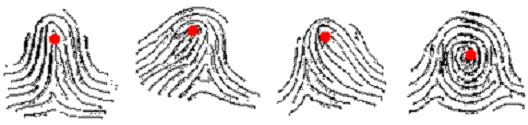
Fig. 1 The positions of fingerprint cores on different fingerprints
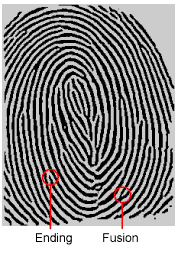 A user’s fingerprint is enrolled, or registered, after a proprietary algorithm extracts unique minutiae points from the fingerprint image (see Fig. 2). The extracted minutiae are then converted into a unique digital template comparable to a 60-digit password. This template is then encrypted before being stored in a database on a computer, a card, or other form of storage. It is important to understand that no actual image of the fingerprint is stored, only the minutiae-based template. The process of enrollment actually takes at least two samples captured from the same finger before that finger is considered registered. When a finger is scanned for matching, the fingerprint reader captures an image, and that image is converted it to a template and compared to the registered fingerprint in a template form.
The quality of your fingerprint is relative to the number and reproducibility of minutiae points in the fingerprint. If the number and relative locations of the minutiae remain consistent whenever your fingerprint is scanned, your scanned fingerprint will more likely match the template of your registered finger. Scanned fingerprints that do not contain adequate minutiae data may not be acceptable during registration. Figure 3 shows poor-quality fingerprints, characterized by smudged, faded, or otherwise distorted areas on the fingerprint. Conditions like these may be attributable to a number of factors, including excessively dry or wet skin, or scarring.
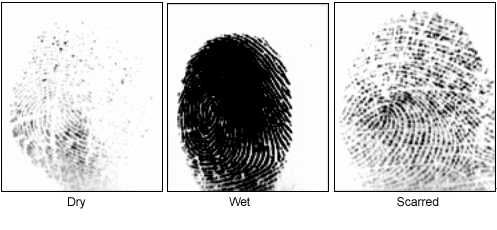
Fig. 3 Examples of poor fingerprint images
SecuGen’s fingerprint matching algorithm is capable of extracting the correct minutiae even without benefit of a perfect print. However, the positioning of your finger and the relative wetness or dryness of your fingerprint when it is placed on the sensor for scanning are both important factors in getting a match. Bright lighting and humidity may also contribute to lowered performance.
The Smart Capture feature eliminates much of the problems caused by dry, wet, scarred or aged skin and bright ambient conditions.
To minimize the chances of rejection by the system, especially in high security environments, you should know how to properly position your finger on the fingerprint reader. The best advice is to cover the glass of the sensor completely with your finger to ensure that the maximum fingerprint surface area is exposed to the scan. A common mistake is to touch the sensor with the tip of your finger, which contains little or no usable minutiae.
Dry, wet, scarred or aged fingerprints often are the cause for a biometric system to encounter problems such as regular or intermittent failure to capture (low image quality), failure to extract minutiae, failure to enroll a finger, or failure to match a correct finger.
A typical solution for resolving problems due to dry, scarred or aged fingerprints has been to moisturize the fingerprint by applying lotion, breathing on it, or touching your forehead before applying it to the sensor.
A typical solution for resolving problems due to wet fingerprints has been to wipe the finger or apply absorbent powder immediately before applying the finger to the sensor.
A better solution that can eliminate most of these problems is to use a SecuGen reader equipped with Smart Capture. When you enable the Smart Capture feature, it will automatically adjust the reader during scanning so that it can accept dry, wet, scarred or aged fingers and obtain high quality fingerprints.
In order to capture the most minutiae, place your finger so that the base of your fingernail (cuticle) is centered in the fingerprint reader window. It helps if you cover the window completely. It is okay for your fingertip to extend beyond the edge of the sensor as long as the your fingerprint core is centered. Apply pressure lightly and evenly without moving it during the capturing process. Figure 4 shows the correct positioning of the fingerprint on the input window. Figure 5 shows the most common mistakes made during the initial phase of enrollment.
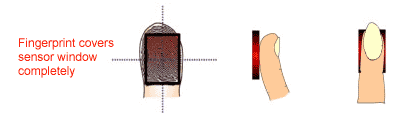
Fig. 4 Correct placement
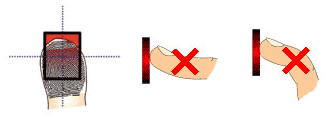
Fig. 5 Common mistakes
During enrollment, the biometric system may require you to scan your finger more than once. Multiple scanning is important because the system performs an internal check of multiple scans to ensure accuracy of the minutiae extracted from the fingerprints. Multiple scanning will also help to reduce the chance for matching error by ensuring quality templates are enrolled from good quality fingerprints.
SecuGen’s fingerprint algorithms are robust enough to accept fingerprints placed at any angle. It is more important to make sure that the core of the fingerprint is centered on the reader so that the minutiae will be properly scanned.
When using SecuGen readers with third party algorithms, please consult the recommendations made by the maker of the algorithms.
Apply pressure lightly and evenly during the capturing process. You only need to apply as much pressure as is required to hold a piece of paper between your fingers. Pressing too hard may result in an overly dark or blurred image. On the other hand, if too little pressure is applied, the resulting image may be too faint, similar to the dry fingerprint. A little practice is all that is needed for users to get the feel of it.
As a preventative measure, it is best to enroll more than one finger so that if one finger becomes unavailable for authentication, you will have an alternate finger to use. For this reason, many biometric applications require or provide the option of enrolling multiple fingers. Also, some biometric applications provide an alternative or emergency authentication method in case no finger or properly working fingerprint device is available.
If none of the above options are available, please contact your IT administrator or technical support provider for help. For SecuGen software support, you may contact our Technical Support Team.
User guides with information about usage, care, and maintenance of SecuGen readers are available on our product guides support page. There you may also find installation instructions, trouble-shooting tips, and information about how to optimize your reader for better performance.